Narrative vs Photo Mechanic
Which culling tool is right for you?

Lock in for 12 months and get 30% off! See Pricing
Which culling tool is right for you?
Photo Mechanic is a fast manual browser built for ingest, captioning and metadata. Narrative adds AI-assisted culling, so you review ranked photos with assessments beside them.
If you already own Photo Mechanic, Narrative can sit alongside it for culling.
Narrative’s plans start at $10 a month billed yearly. Photo Mechanic costs $14.99 a month, $149 a year, or $299 for a perpetual licence (as of November 2026).
Photo Mechanic is a fast photo browser and metadata tool. Photographers use it to ingest from memory cards, pick selects by hand, add captions and keywords, and export.
It is a manual tool with no AI culling. It suits photographers on tight deadlines and anyone who relies on IPTC metadata and captions.
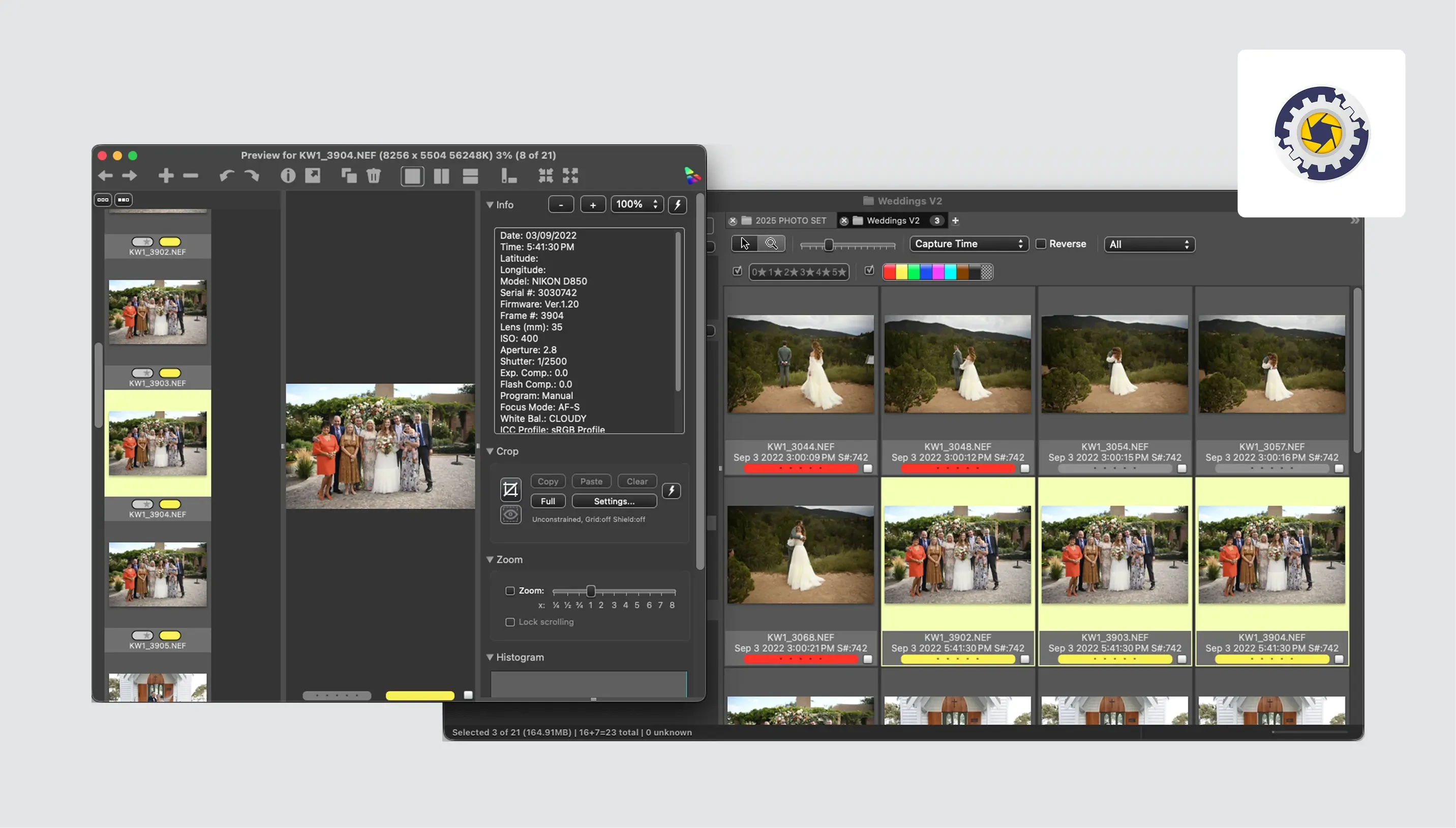
Ingest: copies photos from several memory cards at once, adding IPTC metadata, renaming files and copying to multiple destinations as it goes.
Metadata and batch tools: captions, keywords and Code Replacements for fast entry, plus batch rename, resize and watermark.
Multi-camera time sync: adjust capture times so photos from several cameras sort in the right order.
Export: upload to services like PhotoShelter, Zenfolio and SmugMug, build web galleries, or send photos by email.
No AI culling: every selection is yours to make, using ratings, color labels and side-by-side compare.
No photo editing: editing happens in your editing software.
Licence terms: a perpetual licence includes one year of updates. Subscriptions include updates while active.
Narrative is an AI-assisted photo culling and editing app for professional photographers who shoot people-focused, high-volume sessions. Its AI ranks your photos and explains each assessment, and you make the final call.
It suits weddings, portraits, families and events, where many faces need checking.
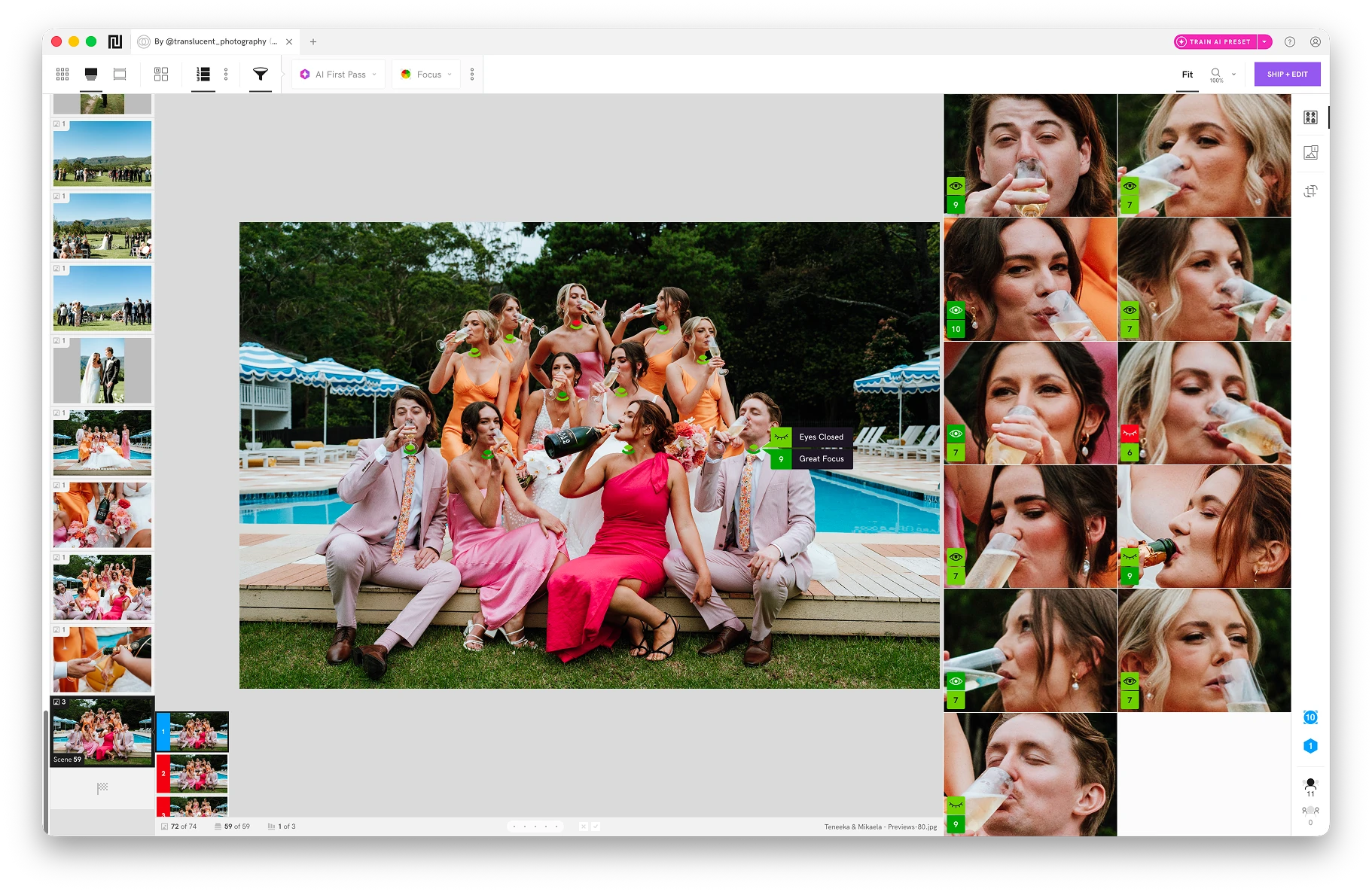
AI assessments: focus, eye and expression checks on each main face. They are warnings, not verdicts.
Scenes View: groups similar photos and ranks them, so the strongest frame in each moment comes first.
Close-ups Panel: enlarged faces beside the full photo, so you can check expressions without zooming.
Editing handoff: ship selects to Lightroom Classic or Lightroom CC with an AI Preset applied, or to Capture One and Photoshop on Mac.
Ingest: copy from several memory cards at once, with up to four backup folders.
Plan limits: Scenes, Close-ups and Face Assessments are on Standard, Premium and Ultra. Lite is culling without AI assessments.
Mac-only features: the People Filter and key-element Close-ups need a Mac for now (macOS 14 or later for key elements).
Lighter metadata: ratings, color labels, tags and rejects are saved in XMP files. Narrative doesn’t offer Photo Mechanic’s IPTC templates or captioning tools.
No finished exports: Narrative doesn’t export finished JPEGs. That happens in your editing software.
If you already have a perpetual Photo Mechanic licence and want culling-specific features such as the Close-ups Panel and AI First Pass, a combined workflow could be worth considering.
Keep Photo Mechanic for ingest and metadata, and add Narrative for culling. The Close-ups Panel and AI First Pass are on Narrative’s Standard, Premium and Ultra plans.
Copy photos from your cards, add captions and IPTC metadata, and rename files.
Create a project from the folder, review ranked photos with assessments, Scenes and Close-ups, and rate your selects.
Ship your selects from Narrative to Lightroom, with an AI Preset applied if you choose.
 Narrative
 Photo Mechanic
Human-led: AI ranks and explains, you decide
Manual: you choose using ratings, labels and compare
Focus, eye and expression assessments (Standard and above)
None
Survey Mode, up to 12 photos
Yes
Ratings, labels and tags saved in XMP files
Deep IPTC, captions, keywords and batch tools
AI Presets applied in Lightroom
Batch resize, watermark and rename; photo editing happens elsewhere
Lightroom Classic, Lightroom CC, Capture One and Photoshop (drag and drop on Windows)
Your editing software
From $10 p/m billed yearly (Lite). AI assessments from $20 p/m (Standard)
$14.99 p/m, $149 a year, or $299 perpetual (1 year of updates)
Photo Mechanic is fast, but every decision is yours to make.
Narrative checks focus, eyes and expression on each main face, groups similar photos into Scenes and ranks them, so you can see where to look first.
Narrative is built to feel familiar, with shortcuts, layout and features you will recognize.
It is a standalone app, so you can cull and rate without Lightroom.
Apply an AI Preset when you ship your selects to Lightroom, so photos arrive already edited.
Personal AI Presets trained on your own edits are on the Premium and Ultra plans.
Close-ups, Scenes and Face Assessments are designed for weddings, portraits, families and events, where many faces need checking.
The choice between these tools comes down to what your actual problem is.
Photo Mechanic is a mature tool for fast ingest, metadata management and file handling. It is a manual tool, so every selection is yours to make, and it has no AI culling.
If you shoot architecture, landscapes or products, where face detection matters less, Photo Mechanic’s manual speed and metadata tools may be all you need.
Choose Narrative if you shoot people at volume and want AI assessments, Scenes and Close-ups to speed up culling while you make every call. It also applies AI Presets for editing in Lightroom.
If you already own Photo Mechanic, you can keep it for ingest and metadata and add Narrative for culling.
See which features each Narrative plan includes on the pricing page.
Yes. Narrative ships to Lightroom Classic (Mac and Windows) and Lightroom CC with your star ratings, color labels and tags, plus an AI Preset if you choose. AI Presets apply in Lightroom only.
On Mac it also opens your selects in Capture One and Photoshop. On Windows you drag photos into them instead.
Photo Mechanic is designed to work alongside your other post-processing tools.
Yes. New Narrative accounts get 30 days of Ultra, its highest plan, with no payment card needed. It includes the AI culling tools and unlimited editing.
Photo Mechanic offers a free 30-day trial with no payment info required. It is limited to one trial per customer.
Yes. When you ingest from a memory card, Narrative copies your photos to your working folder and up to four backup folders at once, so you have extra copies before you start culling. You can ingest from several cards at the same time.
Backups include photos only, not video, and they don't update with later ratings or edits. Keep your card until you've checked every folder.