Lock in for 12 months and get 30% off! See Pricing
Which AI tool is right for you?
Evoto is an AI photo editing and portrait retouching app that also offers AI culling and tethered shooting. Narrative is an AI-assisted culling app that ships your selects to Lightroom, with AI Presets for editing.
Evoto can retouch skin, faces, hair and backgrounds, and cull to a set number of photos. Narrative focuses on culling, and its editing applies preset data in Lightroom. You make the final call.
Evoto charges credits, 1 per exported edited photo, with annual plans from US$89 for 800 credits. Narrative’s plans start at $10 a month billed yearly, and Standard at $20 a month includes unlimited editing with AI Presets (as of November 2026).
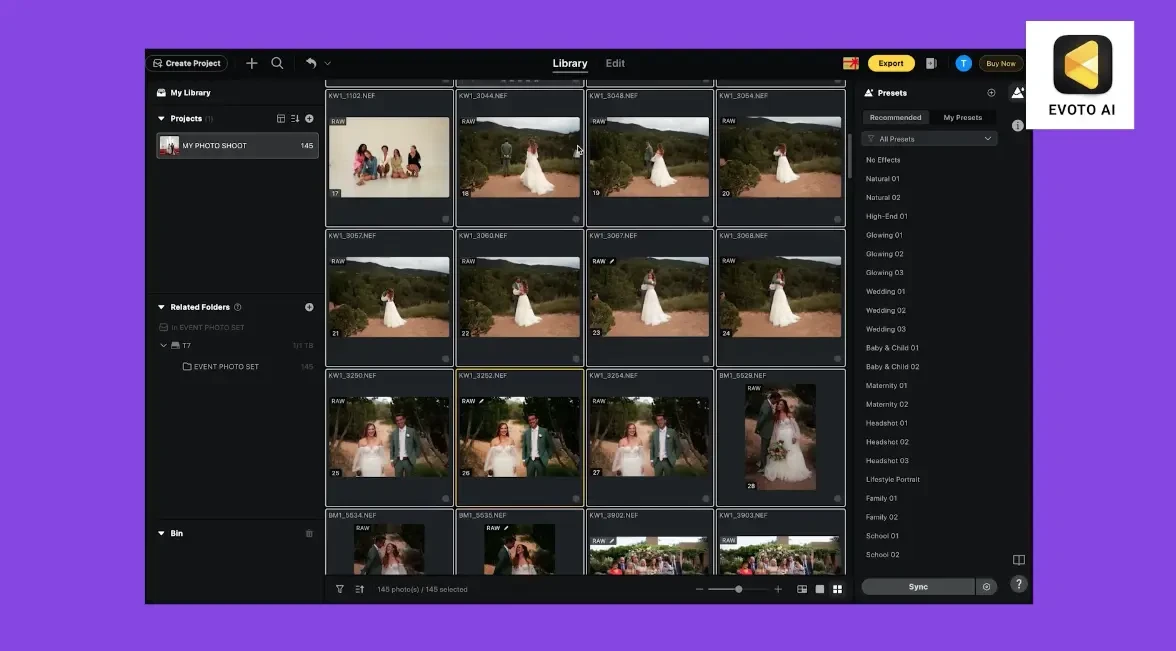
Evoto is an AI photo editor built around portrait retouching. It runs on desktop, mobile, iPad and online, and covers tethering, culling, retouching, batch processing and delivery in one app.
Its AI Culling groups photos into Stories, flags closed eyes, blur and exposure problems, and can limit the AI selection to a set number of photos.
Portrait retouching: per-face skin, blemish, eye, teeth and hair retouching, plus reshape, makeup and background tools.
Batch editing: apply edits once and sync them across the full set.
Presets: save bundles of retouching, color and AI settings and apply them in one click.
Tethered shooting: connect your camera and shoot, cull and edit in one workflow with Evoto Instant.
Lightroom Classic support: send photos from Lightroom Classic with Edit in Evoto, or import and export Lightroom catalogs.
Credit-based pricing: exporting an edited photo costs 1 credit, and some advanced AI generative tools cost more.
Cloud processing: most features upload photos to Evoto’s servers, and Evoto says images are deleted once processing is complete.
Culling works per project: Smart Culling runs on a whole project, not on individual folders.
Its own library: Evoto has its own library and projects alongside your Lightroom catalog.
Narrative is an AI-assisted photo culling and editing app for professional photographers who shoot people-focused, high-volume sessions. Its AI ranks your photos and explains each assessment, and you make the final call.
It runs on your computer. When you finish, ship your selects to Lightroom, with an AI Preset applied if you choose.

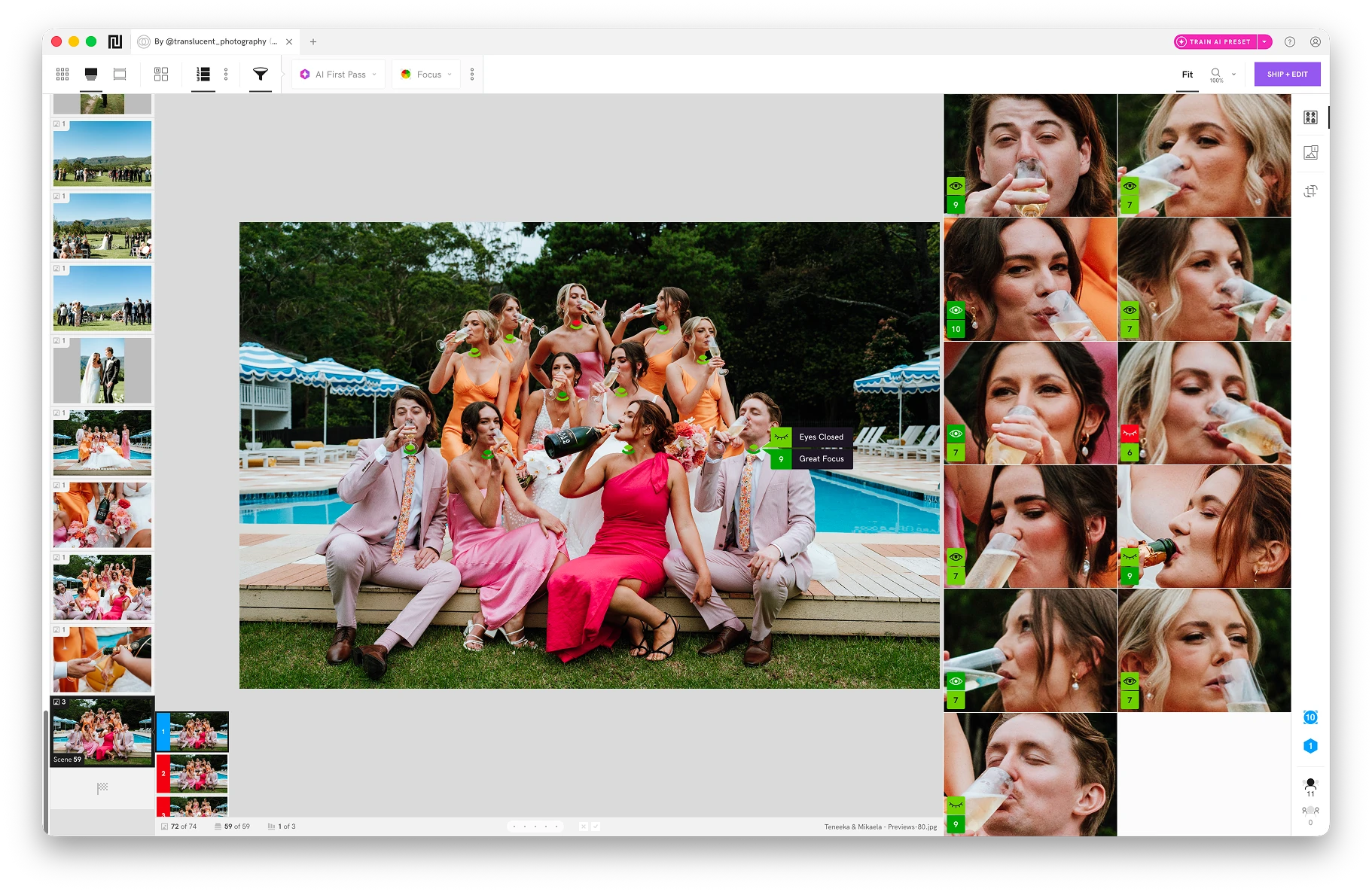
AI assessments: focus, eye and expression checks on each main face. They are warnings, not verdicts.
Scenes View and Close-ups: groups similar photos and ranks them, with enlarged faces beside the full photo.
Works on your computer: culling and assessments run locally, and you can work offline for up to 30 days between sign-ins.
Editing handoff: ship selects to Lightroom Classic or Lightroom CC with an AI Preset, or to Capture One and Photoshop on Mac.
Unlimited editing: Standard and above include unlimited editing with AI Presets, with no per-export credits.
No portrait retouching: AI Presets handle color, tone and exposure in Lightroom, not skin, face or background retouching.
No cull to a set number: Ruthless, Balanced and Cautious change how strict AI First Pass is, not how many photos it keeps.
Plan limits: Scenes, Close-ups, Face Assessments and AI First Pass are on Standard, Premium and Ultra. Lite is culling without AI assessments.
Needs Lightroom for editing: AI Presets apply in Lightroom, and Narrative doesn’t export finished JPEGs.
Both use AI to help you choose photos, and they work differently.
Evoto groups photos into Stories and can cull to a set number in the cloud. Narrative ranks photos on your computer and shows the reasoning, and you review every image.
Stories: groups photos by visual similarity into Segments you can reorder and rename, or start from an empty Story.
AI selection: scores photos and can limit the AI selection to a set number of photos.

Rules: flags closed eyes, blur, underexposure, overexposure and duplicates, with Low, Medium or High sensitivity.
Faces: a face library to filter photos by person.
Cloud-based: most features upload photos to Evoto’s servers.
AI First Pass: sorts each Scene into five tiers with color-coded reasons. Choose a Ruthless, Balanced or Cautious pass.
Scenes View: groups similar photos into Scenes and ranks them within each Scene.
Face Assessments and Close-ups: eye, expression and focus indicators on each main face, with enlarged faces beside the photo.
On your computer: culling and assessments run locally.
You decide: you review every image, and assessments never reject or delete a photo.
Narrative’s editing applies preset data to make your post-production more consistent and faster. There is no generative AI, and your original photos aren’t modified.
Evoto’s editing goes further into retouching. It can change what is in the photo, including skin, faces, backgrounds and group shots.
Preset data, not generative AI: an AI Preset applies editing settings, the same kind of adjustments you would make with sliders in Lightroom. It doesn’t generate, add or remove anything in the photo.
Original photos aren’t modified: you finish and export in Lightroom.
Consistent across a shoot: an AI Preset adapts its edit to each photo’s lighting and tone, keeping color, tone and exposure consistent.
Faster post-production: ship your selects with an AI Preset applied, so they open in Lightroom with a base edit.
Pre-Edit Panel (beta): preview and apply AI Presets while you cull, so you rate and choose edited photos. Ultra includes early access.
Your style: Core AI Presets are on Standard and above, and Personal AI Presets trained on your edits are on Premium and Ultra.
Per-face retouching: smooths skin, removes blemishes, and retouches eyes, teeth and hair on each face.
Reshape and backgrounds: face and body reshape, makeup, and background replacement.
Perfect Group Photo: picks the best expression for each person across several photos and generates a single group shot.
Generative tools: Evoto says some advanced AI generative tools cost more credits, and shows the price before you use them.
Presets: one-click bundles of retouching, color and AI settings.
Narrative
EvotoAI-assisted culling, with AI Presets applied in Lightroom
AI photo editing and portrait retouching, with AI culling
On your computer. Works offline for up to 30 days between sign-ins
Mostly cloud. Most features upload photos for processing
AI ranks and explains. You review every image
AI groups photos into Stories and flags closed eyes, blur and exposure issues
No
Yes
No. AI Presets apply color, tone and exposure in Lightroom
Per-face skin, eye, teeth and hair retouching, reshape and background tools
Ships to Lightroom Classic and Lightroom CC in one click, with an AI Preset if you choose
Edit in Evoto from Lightroom Classic, or import and export Lightroom catalogs
From $10 p/m billed yearly (Lite). Unlimited editing with AI Presets from $20 p/m (Standard)
Credits: 1 per exported edited photo. Annual plans from US$89 for 800 credits
Evoto and Narrative both use AI to speed up your workflow, and they do different jobs.
Choose Evoto if you want AI portrait retouching, background tools, tethered shooting, and the option to cull to a set number of photos in one app.
Choose Narrative if you want to cull on your computer with AI assessments, Scenes and Close-ups, make every call yourself, and edit in Lightroom with AI Presets.
Two practical differences: Evoto uploads photos for processing and charges credits per export, and Narrative doesn’t retouch portraits.
See which features each Narrative plan includes on the pricing page.
They can fit together. Narrative ships your selects to Lightroom Classic, and Evoto can take photos from Lightroom Classic with Edit in Evoto, for portrait retouching.
Whether the extra step is worth it depends on how much retouching your shoots need.
Yes for both. New Narrative accounts get 30 days of Ultra, its highest plan, with no payment card needed.
Evoto offers a 7-day free trial on its subscription plans, and 50 free credits to try its features.