Lock in for 12 months and get 30% off! See Pricing

Narrative vs Lightroom Classic

Which tool should you use for culling and editing?

Lightroom Classic is Adobe’s desktop editing and cataloguing app. Narrative is an AI-assisted culling app that ships your selects to Lightroom Classic for editing.


They do different jobs, and many photographers use them together. This page compares Lightroom Classic’s Assisted Culling with Narrative’s culling tools.


Adobe’s Photography plan, which includes Lightroom Classic, is US$19.99 a month on an annual plan billed monthly. Narrative’s plans start at $10 a month billed yearly (as of November 2026).

What is Lightroom Classic?

Adobe Lightroom Classic is a desktop photo editing and cataloguing app. Many professionals use it for editing, organizing and exporting their work.


It includes Assisted Culling, an AI feature that analyzes photos for subject focus, eye focus and open eyes, and can reject exposure problems, misfires and photos of documents.
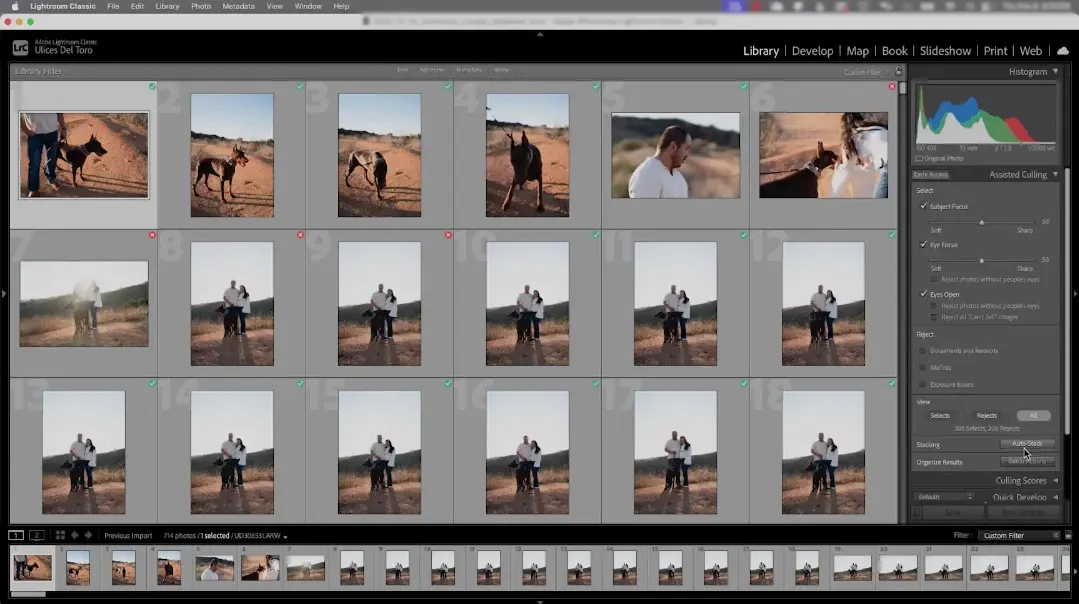
Lightroom Classic Library grid with the Assisted Culling panel open, showing the Subject Focus, Eye Focus and Eyes Open select filters.

Lightroom Classic strengths

  • Editing tools: color mixer, masking, retouching and Generative Remove, plus presets.

  • Catalog and metadata: collections, keywords, face recognition, stacks and duplicate finding across a large library.

  • Output: export, publish services, print, web galleries and slideshows.

  • Tethered shooting: import from a tethered camera.

  • Assisted Culling built in: select and reject photos, auto stack, and apply flags, ratings and labels in batches.

Lightroom Classic limits

  • Culling is one feature of many: Assisted Culling sits alongside editing, cataloguing, print and web tools.

  • Filter-based selection: Select options are Subject Focus, Eye Focus and Eyes Open, each with a threshold you set, plus reject options.

  • Subscription only: Lightroom Classic is included in Adobe’s Photography plan at US$19.99 a month (annual plan, billed monthly).

What is Narrative?

Narrative is an AI-assisted photo culling and editing app for professional photographers who shoot people-focused, high-volume sessions. Its AI ranks your photos and explains each assessment, and you make the final call.


It works alongside Lightroom: you cull in Narrative, then ship your selects to Lightroom Classic with your ratings, with an AI Preset applied if you choose.

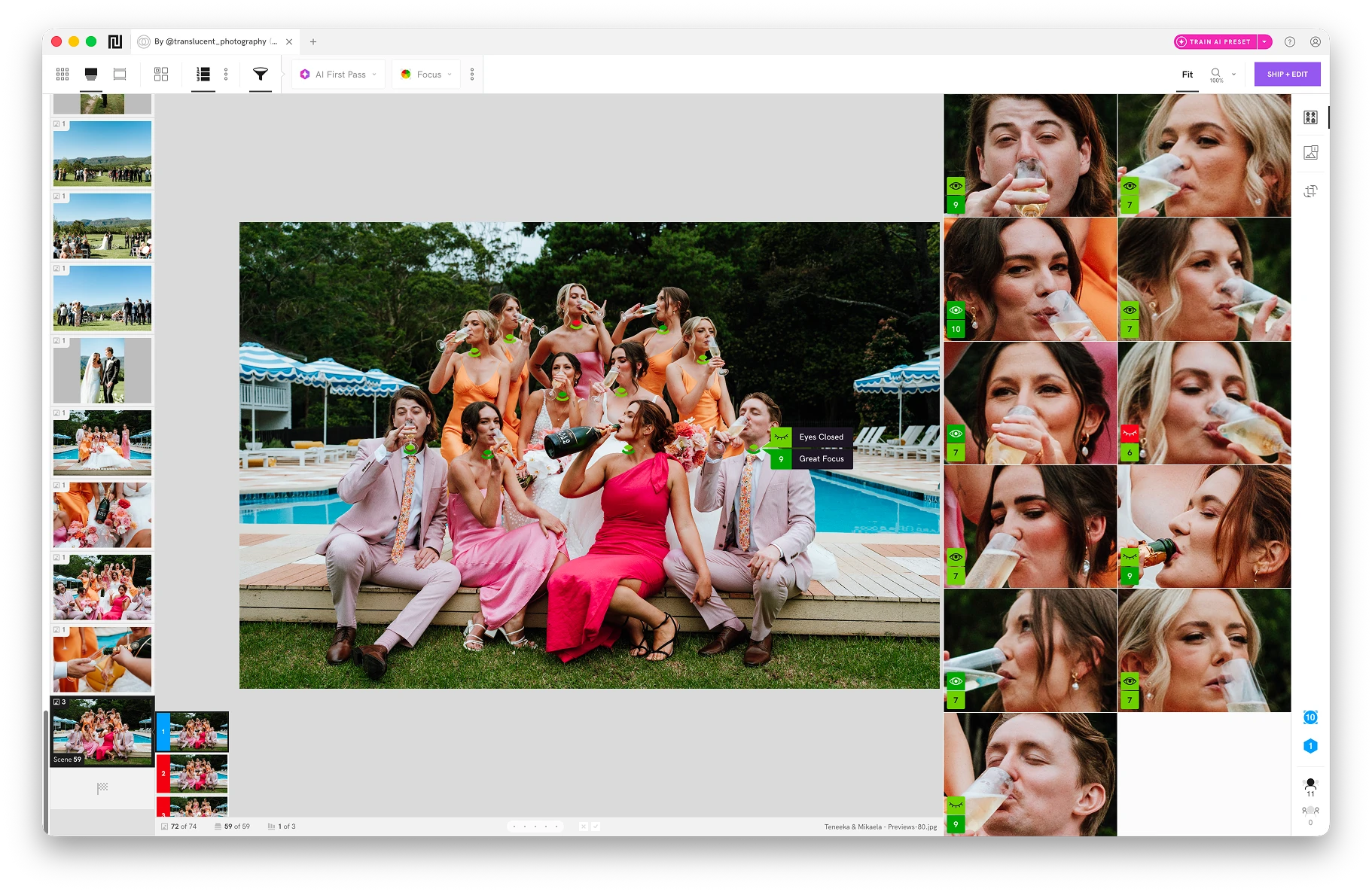
Narrative groups a shoot into its natural scenes and ranks images within each scene by sharpness, surfacing the strongest frame first across portraits, details, florals, and wildlife. (Left: Scenes View, Right: Close Ups Panel)

Narrative strengths

  • AI assessments: focus, eye and expression checks on each main face. They are warnings, not verdicts.

  • Scenes View: groups similar photos and ranks them, so the strongest frame in each moment comes first.

  • Close-ups Panel: enlarged faces beside the full photo, so you can check expressions without zooming.

  • Lightroom handoff: ship selects to Lightroom Classic or Lightroom CC with ratings, color labels and tags, plus an AI Preset if you choose.

  • Fast import: Narrative says you can import thousands of RAWs in seconds and see images instantly.

Narrative limits

  • Plan limits: Scenes, Close-ups, Face Assessments and AI First Pass are on Standard, Premium and Ultra. Lite is culling without AI assessments.

  • Not an editor on its own: AI Presets are applied in Lightroom, and Narrative doesn’t export finished JPEGs. Editing happens in Lightroom Classic.

  • Mac-only features: the People Filter and key-element Close-ups need a Mac for now.

  • Lighter metadata: ratings, color labels, tags and rejects are saved in XMP files. There is no catalog.

Assisted Culling vs Narrative’s Culling

Both use AI to help you choose photos, and they work differently.


Lightroom Classic scores photos against thresholds you set. Narrative ranks photos within each Scene and shows the reasoning, and you review every image.

Lightroom Classic Assisted Culling

  • Select filters: Subject Focus, Eye Focus and Eyes Open, each with an adjustable threshold.

  • Reject options: exposure issues, misfires, and photos of documents and receipts.

  • Auto Stack: groups photos by time and visual similarity.

  • Batch actions: apply flags, ratings and labels, or add photos to albums, for selected and rejected photos.

  • Scores: see per-photo and per-face scores in the Culling Info panel.

Narrative culling

  • AI First Pass: sorts each Scene into five tiers with color-coded reasons. Choose a Ruthless, Balanced or Cautious pass.

  • Scenes View: groups similar photos into Scenes and ranks them within each Scene.

  • Face Assessments: eye, expression and focus indicators on each main face, with a focus score out of 10.

  • Close-ups Panel: enlarged faces beside the full photo.

  • You decide: you review every image, and assessments never reject or delete a photo.

Narrative
Lightroom Classic
Main job

AI-assisted culling, with AI Presets applied in Lightroom

Editing, cataloguing and export

AI culling approach

AI First Pass, Scenes and assessments. You review every image (Standard and above)

Assisted Culling: selects and rejects against thresholds you set

Face and focus checks

Eye, expression and focus assessments on each main face, plus Close-ups Panel

Subject sharpness, eye sharpness and eyes-open scores per photo and per face

Groups similar photos

Scenes View with ranking

Auto Stack by time and visual similarity

Editing

AI Presets applied in Lightroom

Full editing suite

Where selects go

Lightroom Classic and Lightroom CC with ratings, labels and tags (Capture One and Photoshop on Mac)

Stay in the Lightroom catalog

Pricing

From $10 p/m billed yearly (Lite). AI assessments from $20 p/m (Standard)

Photography plan US$19.99 p/m (annual plan, billed monthly)

Narrative vs Lightroom Classic: Final Verdict

The two tools do different jobs, and many photographers use them together.


Lightroom Classic is a full editing and cataloguing app with Assisted Culling built in. If you want to cull and edit in one place, and filtering by focus and open eyes is enough, it may be all you need.


Choose Narrative for culling if you shoot people at volume and want AI assessments, Scenes, Close-ups and AI First Pass to speed up selection while you make every call.


Narrative works alongside Lightroom Classic. Cull in Narrative, then ship your selects to Lightroom Classic with your ratings, already edited with an AI Preset if you choose.


See which features each Narrative plan includes on the pricing page.

Frequently Asked Questions

Yes. New Narrative accounts get 30 days of Ultra, its highest plan, with no payment card needed. Test culling and one-click shipping to Lightroom Classic (or Capture One on Mac) on one of your own shoots before you commit.

Narrative is designed to feel familiar, with shortcuts, layout and features you will recognize, and you can change the keyboard shortcuts in Preferences. The face and focus indicators are color-coded: green means no issue found, yellow means worth checking, and orange or red means a possible issue. Your star ratings and color labels carry into Lightroom Classic.

Our Culling with Narrative help guides walk you through your first project.

No. Narrative is a standalone app, so you can cull and rate without Lightroom. You need Lightroom Classic or Lightroom CC to apply AI Preset edits, and Lightroom Classic to train a Personal AI Preset.

You can also send your selects to Capture One or Photoshop on Mac, or move and copy them to any folder. Narrative doesn't export finished JPEGs; that happens in your editing software.

By continuing to use this site, you agree to the use of cookies.